I’m pleased to introduce a few much anticipated upgrades for Windows Marketplace for Mobile going live today. We introduced Windows Marketplace with the launch of Windows phones on October 6th and promised a second wave of features in November. Today, we’re adding more advanced anti-piracy protection and an improved developer portal for our registered ISVs, as well as introducing PC based shopping and account management for Windows phone customers.
Showing posts with label windows mobile. Show all posts
Marketplace for Mobile just updated with new features
From Windows Mobile Developer Blog:
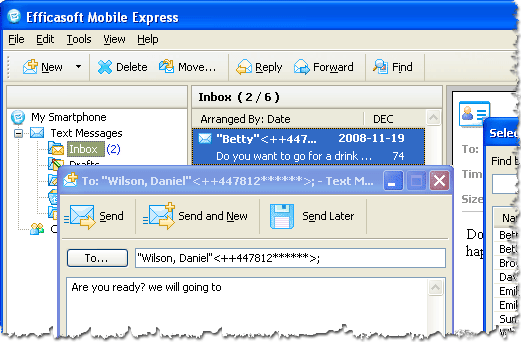
Manage Text Message & Contacts from desktop PC with ease!
Efficasoft Mobile Expres
Efficasoft Mobile Express is a utility helps you managing text message (sms) & contacts from your desktop pc or laptop with ease. And the most important is: ITS FREE!
Its available for download in Efficasoft official website. Try it, and you'll love it!
[Windows Mobile 6.1 Smartphone] Disable/Enable Threaded SMS
If you want to disable the new threaded SMS feature, go to
SMSInboxThreadingDisabled=1
HKCU\Software\Microsoft\Inbox\Settings\OEM\(create if necessary) and edit/create the following DWORD:
SMSInboxThreadingDisabled=1
[Windows Mobile 6.1 Smartphone] Enable/Disable Recipient Address AutoComplete in SMS
To enable the new recipient address suggestions feature in the SMS application, go to
MaxSuggestions=6 (for example)
HKLM\System\Inbox\RecipientAutoCompleteand set/change the following DWORD:
MaxSuggestions=6 (for example)
Reducing or Increasing The Volume of Camera Capture Sound (HTC Snap)
There are so many hidden settings in Windows Mobile 6.1 Standard Edition we could explore. I was playing with my HTC Snap when I found this one. Settings for camera capture sound volume! Try to reduce (I doubt you will increase the volume) to the value that suit your ear.The key can be found at this path:
HKEY_LOCAL_MACHINE\Software\HTC\Camera\Captparam
HTC Snap (Windows Mobile 6.1 Standard) Dock Operator Bar Settings How To
See the different? How to do that?Again, you need a registry editor (find which one suits you most while me myself prefer to use Resco Registry).
- Go to: HKEY_LOCAL_MACHINE\Software\Microsoft\CHome
- Find key named: DockOperatorBar which valued as 0 by default
- This is it! Change the value of this key to "1"
- Restart your phone!
Subscribe to:
Posts (Atom)
